If you’re among those asking why is my iPhone not receiving calls but has internet? Then you should know that it is usually caused by different factors. One frustrating scenario is that you can browse, load your WhatsApp, Facebook, and other things, but cannot receive calls. This issue is likely caused by some settings, outdated software, or carrier problems.
If you’re experiencing this, that does not mean your iPhone is faulty or damaged. It is a common problem in both old and new iPhones, including the latest models, but in all of these, this issue can be fixed. That’s the good news right?
In this guide, you’ll learn the reasons why your iPhone is not receiving calls but has internet, possible causes, how to fix the issue, when to contact your carrier, or Apple. This article will also answer related questions like “why is my iPhone not receiving calls but can call out”. Without further ado, let’s dive in.
Why This Happens (Real Life Scenario)
The issue of your iPhone not receiving calls but having internet has been experienced by many iPhone users. Imagine you are comfortably browsing your socials and even watching videos on YouTube. Suddenly, your friend told you that he/she been calling but couldn’t reach you.
However, if you’ve ever encountered this problem of having a strong internet connection but can’t receive calls, this means there’s something wrong with the following:
- Your Carrier connection
- Your network settings
- Your cellular voice settings
- Call related features like Focus Mode
- Or Blocked Numbers
Additionally, it is also important to know that the internet and phone calls don’t use the same signal. The internet signal uses the LTE, 5G, or Wi-Fi signal, while the phone calls use the cellular voice network to receive and send calls.
Reasons Why Your Phone is Not Receiving Calls
1. Do Not Disturb or Focus Mode is Turned On
One of the most common reasons why your phone is not receiving calls but has internet is when Focus Mode or Do Not Disturb is enabled. It silences your calls, which won’t allow your phone to ring out, or may even push your call to voicemail.
To fix the error;
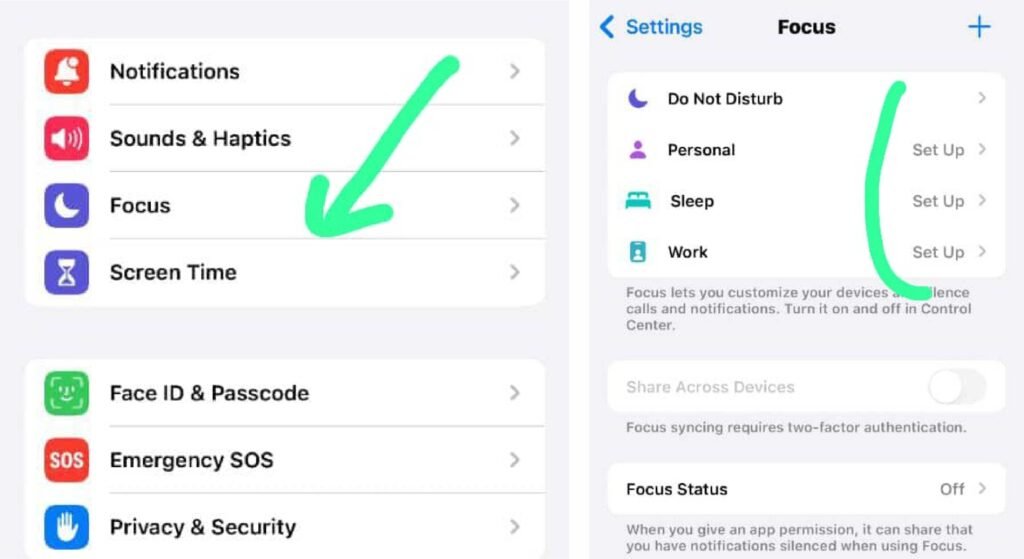
- Go to phone Settings.
- Go to Focus.
- Turn off all active Focus modes (Personal, Sleep, Work, etc.).
2. Weak Cellular Signal
It might appear that your iPhone shows a strong signal, but the cellular network signal for calls is weak. This could be one of the reasons why your iPhone is not receiving calls, even with an internet connection.
When this happens, you may notice that your phone can’t receive calls, but you can make calls, or your calls go straight to voicemail.
This always happens when:
- You are indoors
- You are in a rural area with no strong signal
- Or a temporal issue from your Carrier.
To fix this error, you can either restart your phone or move a bit from where you were.
You can also check this article Why Does My Phone Say SOS? Reasons & Quick fix (iPhone & Android)
3. Airplane Mode is Turned On
Sometimes Airplane Mode might be turned on, and your Wi-Fi is turned on at the same time, creating a state of confusion where you can’t receive calls but your internet works. Most people make this unaware mistake, resulting in a situation where you can browse the internet but can’t receive calls.
To fix this error:
- Go to your Phone Settings
- Turn off Airplane Mode
- Then restart your iPhone (it is also applicable to other phone models).
4. Carrier Network Issues
Most times, the issue of you not being able to receive calls but having an internet connection might be a result of issues or glitches from your Carrier. Your Carrier might be experiencing a temporary outage, call routing issues, or a call glitch.
This commonly happens when you recently changed your plans, switched from a physical SIM to an eSIM, you ported your number, or even changed to a new phone. So if you’re one of those asking why is my new phone not receiving calls, but your old phone is? Then it is a carrier-related issue, because your old phone might be registered with the carrier, while the new one isn’t.
To fix this error, you need to contact your Carrier to help you fix the issue.
5. Wrong Network Settings
Wrong network settings or network glitches can lead to your iPhone not receiving calls, while the internet connection is still working. You can easily reset your network settings.
To reset your network settings:
- Go to phone Settings
- Click on General
- Click on Transfer or Reset iPhone
This will erase the Wi-Fi password but not your phone data.
6. When Call Forwarding is enabled
If call forwarding is enabled, it may divert your calls to another number even without your notice. This could be another reason why your iPhone is not receiving calls. This usually happens to iPhone users who migrated to a new iPhone, switched from a physical SIM to an eSIM, or switched their carrier.
To fix this:
- Go to phone Settings
- Click on Phone
- Go to Call forwarding and turn it OFF.
7. iOS Software Bugs or Update Issues
Software bugs or update issues are one of the causes why your iPhone is not receiving calls, even if it has an internet connection. An iOS software issue is likely the reason why you are not receiving calls on your iPhone, especially for the iPhone 16.
To Fix this:
- Go to Settings
- Click on General
- Tap on Software Update and ensure all pending updates are installed
- Then restart your phone
8. Check for Blocked Numbers or Silence Unknown Callers
If you’re receiving calls for a particular person, it means the number(s) are blocked either mistakenly or intentionally. So make sure you check for blocked contacts and unblock the number(s). Also check for numbers in silence, unknown callers, and remove them.
To Fix this:
- Go to phone Settings
- Click on Apps
- Click on Phone
- Click on Blocked Contacts and Unblock the blocked numbers
To Fix Silence Unknown Callers:
- Go to Settings
- Click on Apps
- Click on Phone
- Then click on Silence Unknown callers and add the numbers to your Contacts.
Quick Fixes to the Problem
- Turn off Focus Mode
- Check for blocked numbers
- Disable call forwarding
- Restart your iPhone
- Reset your phone’s network settings
- Update iOS
When You Should Contact Your Support
Contact your Carrier for Support if:
- After trying all fixes, and your iPhone still doesn’t receive calls
- Call fails across multiple locations
- Your calls fail even after paying your bills
- Your new iPhone cannot receive calls, but the old one can
Contact Apple Support If:
- Incoming calls go directly to voicemail
- Receiving calls fails after an iOS update
- You recently activated a new iPhone or iPhone 16
- SIM card works on another phone and doesn’t work on yours
- When you suspect hardware issues
Final Thoughts
So if your iPhone is not receiving calls but has an internet connection, then you should know the possible causes and how to fix them. Whether the issue comes from the wrong settings, iOS software bugs, network Glitches, or Carrier issues, just ensure to try out the different fix options mentioned in this article.
Before contacting either Apple or your carrier support, try the quick fix like performing basic checks, reviewing all your call settings to check for any contradictory settings, resetting your network settings, and restarting your phone, and your phone will start receiving calls.
If after trying out the possible fix options and the issue persists, then you need to contact Apple support or your Carrier’s Support to help you sort the problem. Afterward, your iPhone will start receiving calls.
Frequently Asked Questions (FAQs)
Why is my iPhone not receiving calls but has internet?
This happens because calls use the cellular voice network and not the internet. You not receiving calls might be a problem from your Carrier, wrong settings like blocking of numbers, call forwarding, Focus Mode, etc.
Why am I not receiving calls on my iPhone 16?
This might be a result of wrong settings. Ensure you check for Do Not Disturb, Airplane Mode, Call Forwarding, Silence Unknown Callers, Carrier compatibility problem, or blocked numbers on your iPhone 16.
iPhone not receiving calls from one person
First thing, check if the number has been blocked, if you have enabled silence unknown callers, or network issues.
Why am I not receiving calls on my iPhone but can make them?
This happens most times due to network issues, carrier routing problems, or Focus Mode. To solve this problem easily, you can try restarting your phone. If it persists, contact your Carrier’s support.
Why is my iPhone not allowing me to make calls iPhone?
This problem is usually caused by network problems, SIM card issues, cellular network glitches, or Carrier suspension. So try to fix this, and you can start making calls with your iPhone.